
Mastering Difficult Flips and Precision Challenges in Flipping Is Hard
Mastering Difficult Flips and Precision Challenges in Flipping Is Hard
Introduction
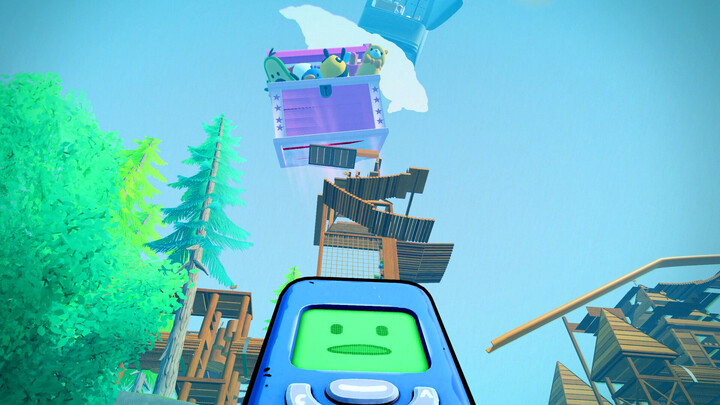
Flipping Is Hard is a challenging 3D precision platformer that turns an unusual idea into a surprisingly demanding adventure. Instead of controlling a traditional character, players take charge of Flippy, an old-fashioned brick phone that must flip, jump, and climb through a strange world known as the Trashlands. After being accidentally thrown into a storm drain, Flippy must overcome dangerous obstacles and make his way back to his owner, Jeff.
Developed by Elegant Horse Studios, the game combines physics-based movement, difficult platforming challenges, and humorous storytelling. Every movement requires careful control because Flippy cannot walk or run. Players must rely entirely on rotation and vibration jumps to reach higher platforms. A small mistake can cause a long fall, making patience and precision essential for success.
1. Understand Flippy's Unique Movement System
The biggest challenge in Flipping Is Hard is learning how to control Flippy. Unlike traditional platform games, there is no normal walking or running. Movement revolves around rotating the phone and using jumps to travel across platforms.
On PC, players use WASD to control rotation, Space to jump, and the mouse to adjust the camera. One important detail is that movement is relative to the camera direction. Changing the camera angle also changes the effective direction of your inputs.
This means that camera control is just as important as movement itself. Before attempting a difficult jump, make sure you understand which direction Flippy is facing and where the next platform is located. Rushing into a jump without checking the camera can easily send you in the wrong direction.
Spend time experimenting with small movements in safe areas. Understanding how rotation affects Flippy's position will make more complicated sections easier to handle.
2. Master High Jumps and Long Jumps
Jumping is the main way to overcome gaps and reach higher platforms. However, Flipping Is Hard features different jump behaviors that players need to understand.
A High Jump is performed by pressing Space without holding a directional movement button. This technique is useful when vertical height is more important than horizontal distance.
A Long Jump works differently. Holding a directional button while pressing Space launches Flippy toward that direction with additional horizontal force. It is particularly useful for crossing wide gaps or reaching distant platforms.
The key is choosing the correct jump for each situation. If a platform is directly above you, a High Jump may be the better option. If you need to cross a large opening, a Long Jump is generally more suitable.
Avoid using the same jumping technique for every obstacle. Study the distance and height of the target before committing to a movement.
3. Learn to Control Momentum and Rotation
Flippy's movement is based on physics, which means momentum can influence the direction and distance of a jump. This makes controlling rotation an important skill, especially when navigating narrow platforms.
One advanced technique is the Momentum High Jump. Players begin rotating Flippy, release all movement inputs, and immediately press Space. The remaining rotational force carries into the jump, potentially giving additional height.
Another useful technique is the Boosted Long Jump. Performing a Long Jump from a wall provides significantly more distance and power, making it valuable for reaching platforms that would otherwise be difficult to access.
These techniques require practice because timing and positioning matter. Start with easier sections and experiment with different movement angles before attempting them in more dangerous areas.
As you become familiar with the physics, you will begin to recognize opportunities to use momentum more effectively.
4. Choose the Right Difficulty Mode
Flipping Is Hard offers different difficulty settings that change how forgiving the climbing experience can be.
Flipping Is Hard is the default challenge, designed for players who want the intended punishing experience. It does not provide checkpoints, meaning a serious fall can force you to repeat a significant portion of your progress.
Flipping Is Chill offers a more forgiving experience with collectible checkpoints. Players can access the checkpoint system through Flippy's phone interface by pressing Tab on PC.
Choosing Chill Mode is a good option for beginners who want to learn the movement system without losing too much progress after every mistake. Once you become more confident, switching to the harder experience can provide a greater challenge.
The important thing is to select a difficulty that allows you to enjoy the game while gradually improving your skills.
5. Study Every Platform Before Jumping
Precision is more important than speed in Flipping Is Hard. Platforms can be narrow, uneven, or positioned at awkward angles, leaving very little room for mistakes.
Before jumping, examine the distance between your current position and the target. Adjust the camera so that you can clearly see the landing area, then align Flippy in the direction you want to travel.
Avoid making unnecessary rotations while airborne. Excessive movement can change your landing position and cause Flippy to miss the platform.
When you reach a safe surface, take a moment to stabilize before attempting the next jump. Rushing through multiple obstacles without checking your position can quickly turn a successful climb into a long fall.
Developing a consistent routine of observing, aligning, jumping, and stabilizing will help make difficult sections more manageable.
6. Explore the Ten Areas of the Trashlands
The Trashlands is the unusual world that Flippy must climb through to return to Jeff. The journey features ten different areas, each introducing its own visual style, obstacles, and platforming challenges.
Players encounter environments inspired by forgotten objects from the 1990s and 2000s. These include cardboard structures, playground elements, Candyland-inspired locations, neon environments, and freezing areas.
As the adventure progresses, new hazards make movement increasingly difficult. Ziplines, cannons, magnets, conveyor belts, and reverse-gravity sections introduce challenges that require players to adapt their approach.
Do not assume that a technique that worked in an earlier area will always be effective in a new one. Pay attention to how each obstacle interacts with Flippy's movement and look for safe opportunities to experiment.
Exploring each environment carefully also makes the journey more interesting, as the Trashlands contains plenty of unusual details and hidden discoveries.
7. Complete NPC Challenges and Discover Collectibles
The main objective is to reach Jeff, but Flipping Is Hard also includes optional activities that reward players who explore beyond the main climbing route.
NPCs throughout the Trashlands offer challenges that test different aspects of Flippy's movement. These activities may require precise jumps, careful navigation, or mastering particular platforming techniques.
Completing challenges can unlock customization rewards, including phone covers, charms, and stickers. These items allow players to personalize Flippy and make the adventure feel more unique.
You can also discover hidden phone games and other collectibles throughout the environment. Pressing Tab opens Flippy's phone interface, where players can access available phone features.
If you enjoy collecting items and completing optional objectives, take time to investigate unusual areas rather than focusing exclusively on reaching the top.
8. Experience Online Co-op With Friends
Although Flipping Is Hard can be played solo, its online co-op mode adds another layer of entertainment. Players can team up with friends and attempt the difficult climb together.
Co-op introduces useful mechanics such as the Help Beam, which can lift nearby players and help them recover from difficult situations. Microwaves also act as one-way elevators, allowing players in higher locations to help teammates below reach their position.
Proximity voice chat makes the experience even more entertaining. Friends can communicate while climbing, coordinate their movements, and react to unexpected falls together.
However, playing with others does not remove the game's difficulty. Teamwork is important, especially when players are separated by large gaps or struggling with the same obstacle.
Whether you are helping a friend recover or watching everyone fall at the same time, co-op creates memorable moments that make the challenge more enjoyable.
9. Develop Patience and Improve Through Repetition
Flipping Is Hard is designed to test patience. Falling is part of the experience, and even experienced players can make mistakes when attempting difficult jumps.
Instead of becoming frustrated after a failed attempt, think about what caused the mistake. Did you rotate too far? Was the camera facing the wrong direction? Did you jump before reaching a stable position?
Try changing one part of your movement at a time. Repeating the same jump with slightly different positioning can help you understand how the physics work and identify a more reliable approach.
Players interested in speedrunning can also take advantage of quick restarts and built-in timing features. These tools make it easier to practice specific sections and improve consistency.
The most important lesson is that progress comes from learning the movement system rather than simply pressing buttons faster.
Conclusion
Flipping Is Hard transforms a simple brick phone into the star of a demanding platforming adventure. Its rotation-based controls, physics-driven jumps, and challenging environments create a gameplay experience where every movement matters.
By mastering High Jumps and Long Jumps, understanding momentum, controlling the camera, and choosing the right difficulty mode, players can gradually overcome the obstacles of the Trashlands. Optional NPC challenges, collectibles, and online co-op provide even more reasons to explore the world.
Whether you prefer climbing alone or struggling alongside friends, patience and precision are the keys to success. Every fall is another opportunity to improve, and every successful landing brings Flippy one step closer to reuniting with Jeff.
Summary: Master Flipping Is Hard with tips for rotation controls, high jumps, momentum, difficult platforms, NPC challenges, collectibles, and online co-op.